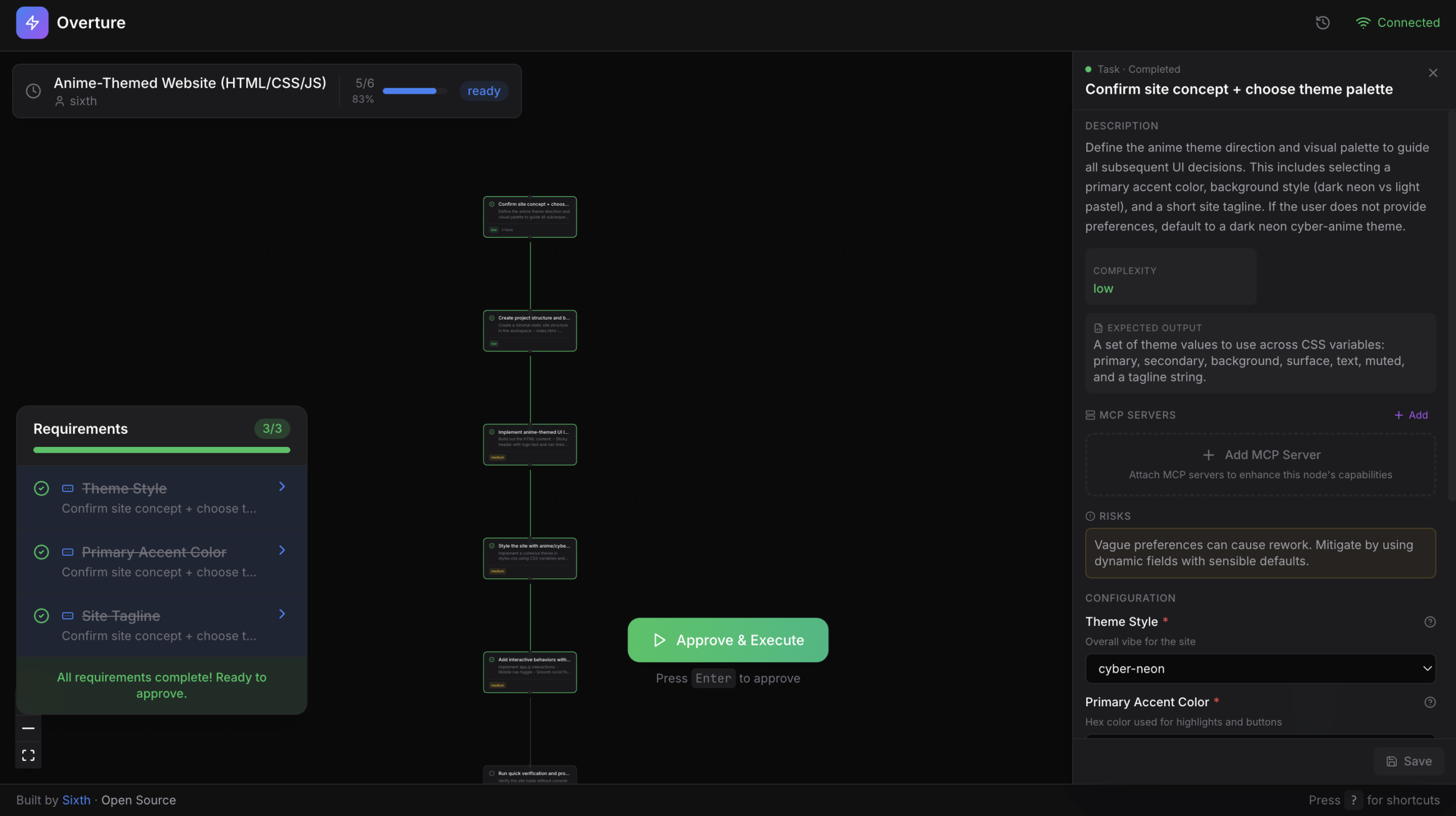

Stop Guessing: How SixHq Overture Visualizes Your AI Agent’s Plan
Written by Abdul Alim (Follow me on X: @CrazzyAlim)
Launched by the team at Sixth, Overture is a locally running web interface delivered as an MCP (Model Context Protocol) server. It intercepts the planning phase of your AI agent and renders it as an interactive visual flowchart. As I often say on X (@CrazzyAlim), visibility is the key to safety in the GenAI era.
The Problem: The “Text-Only” Planning Trap
Current agents show plans as blocks of text in a chat window. But text plans fail to show you how steps relate to each other or where the logic branches. This SixHq Overture Review highlights how the tool fixes this by creating a Visual Plan Execution workflow. Instead of reading a list, you see a graph. You can see which files are being touched and what context each step needs to succeed.
Visualize Your Learning with StudyHelper.io
If Overture helps you visualize code execution, StudyHelper.io helps you visualize your personal growth. As an AI developer, I built StudyHelper.io to help you turn complex info into simple mastery. Here is how we complement your workflow:
- 🎥 Generate Explainer Videos: Turn your Overture flowcharts or technical READMEs into visual video guides.
- 🎙️ Generate Podcasts: Convert deep-dive GitHub documentation into high-quality podcasts for your commute.
- 📺 YouTube to Study Material: Take any AI agent tutorial and get structured cheat sheets instantly.
- 📓 Handwritten Notes to Digital: Turn your whiteboard architecture sessions into clean digital docs.
- 🧠 Quiz & Flashcards: Test your knowledge of new protocols like MCP to stay ahead of the curve.
Don’t just code, master the tech at StudyHelper.io.
Setting Up Overture: 60 Seconds to Clarity
Because Overture uses the Model Context Protocol (MCP), it works with almost any modern agent. Here is how I set it up in my environment for this SixHq Overture Review:
For Claude Code:
claude mcp add overture-mcp -- npx overture-mcp
For Cursor:
Add the following to your mcp.json:
"overture": { "command": "npx", "args": ["overture-mcp"] }
Once installed, Overture opens at http://localhost:3031. You can click on nodes to add context, select between multiple proposed approaches, and watch the “nodes” light up in real-time as the agent completes them.
Frequently Asked Questions (FAQ)
Q: Does Overture work with Windsurf or Cline?
A: Yes! Since it’s an MCP server, it is compatible with Windsurf, Cline, and any other MCP-supported IDE extension.
Q: Is my code data sent to SixHq?
A: No. Overture runs locally on your machine. It only acts as a bridge between your agent and your local browser.
Final Verdict: A Must-Have for “Agentic” Coding
My SixHq Overture Review concludes that this tool is essential for anyone doing serious development with AI agents. It shifts the power back to the developer, turning the AI from a “renegade coder” into a “collaborative architect.” It’s open-source, lightweight, and saves a massive amount of tokens and time.
Connect with me on LinkedIn to discuss the future of MCP, and don’t forget to check out StudyHelper.io for all your learning needs!
Happy coding,
Abdul Alim

Leave a Comment